
Telia Smart Connect is also available as an app on both the App Store and Google Play. This means that you can access your switchboard on your mobile devices with just a few taps, making it even more convenient to have full control.





When your phone rings, the number on the screen does not always tell the whole story. With Number Lookup in the Smart Connect mobile app, incoming calls are matched with your company directory to help you recognise who is calling and understand the context before answering.
What is Number Lookup?
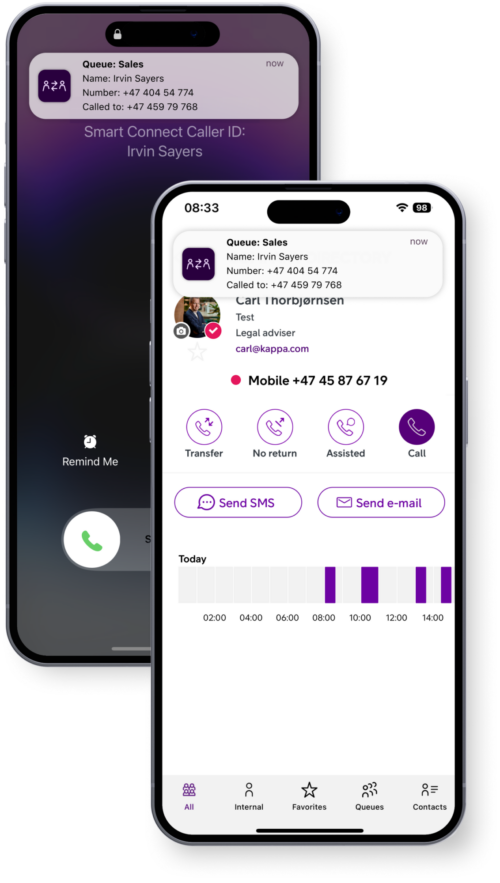
Number Lookup is a feature in the Smart Connect mobile app that helps identify incoming calls. It displays the caller’s name, which queue the call is coming through, and which of your numbers the call is directed to.
When enabled, the app checks incoming numbers against your company directory. If the number belongs to a colleague or a contact saved in the directory, their name appears on the call screen, in push notifications, and in call logs, without you having to save every number in your local contact book.
In supported markets (Finland & Norway), Number Lookup can also match incoming numbers against the national number directory, allowing publicly listed external callers to be identified.
The main benefits of using Number Lookup
Number Lookup improves your call handling by giving you the context you need, by showing who’s calling, which queue the call came through, and which number it was directed to.

Personalized greetings
Greet callers by name and with the right context, for a professional and personal touch.

Efficient decision making
Quickly assess your next move, whether to transfer the call, to whom, or if you should call back.

Focused work
When temporarily busy, you can tell at a glance whether a call needs your attention right now or can be returned later.

No missed opportunities
Never miss an important call by recognizing key customers and colleagues instantly.
Main use cases of Number Lookup
Number Lookup adds value in many situations where additional context makes a difference before you answer.
When colleagues call in large organisations
In bigger companies, it is not realistic to store every colleague in your local contact list. If they are listed in the company directory, their name will still be displayed, making internal communication smoother.
When a key customer calls
External contacts such as customers can be added to the company directory. These contacts can be saved privately or shared across the organisation, allowing colleagues to recognise important callers.
When you need to prioritise your time
If you are in the middle of focused work or a meeting, seeing who is calling, and what queue and number the call is directed to, helps you assess whether it requires immediate attention or can be returned later.
How to enable Number Lookup
Number Lookup is activated directly in the Smart Connect mobile app.
For iOS
-
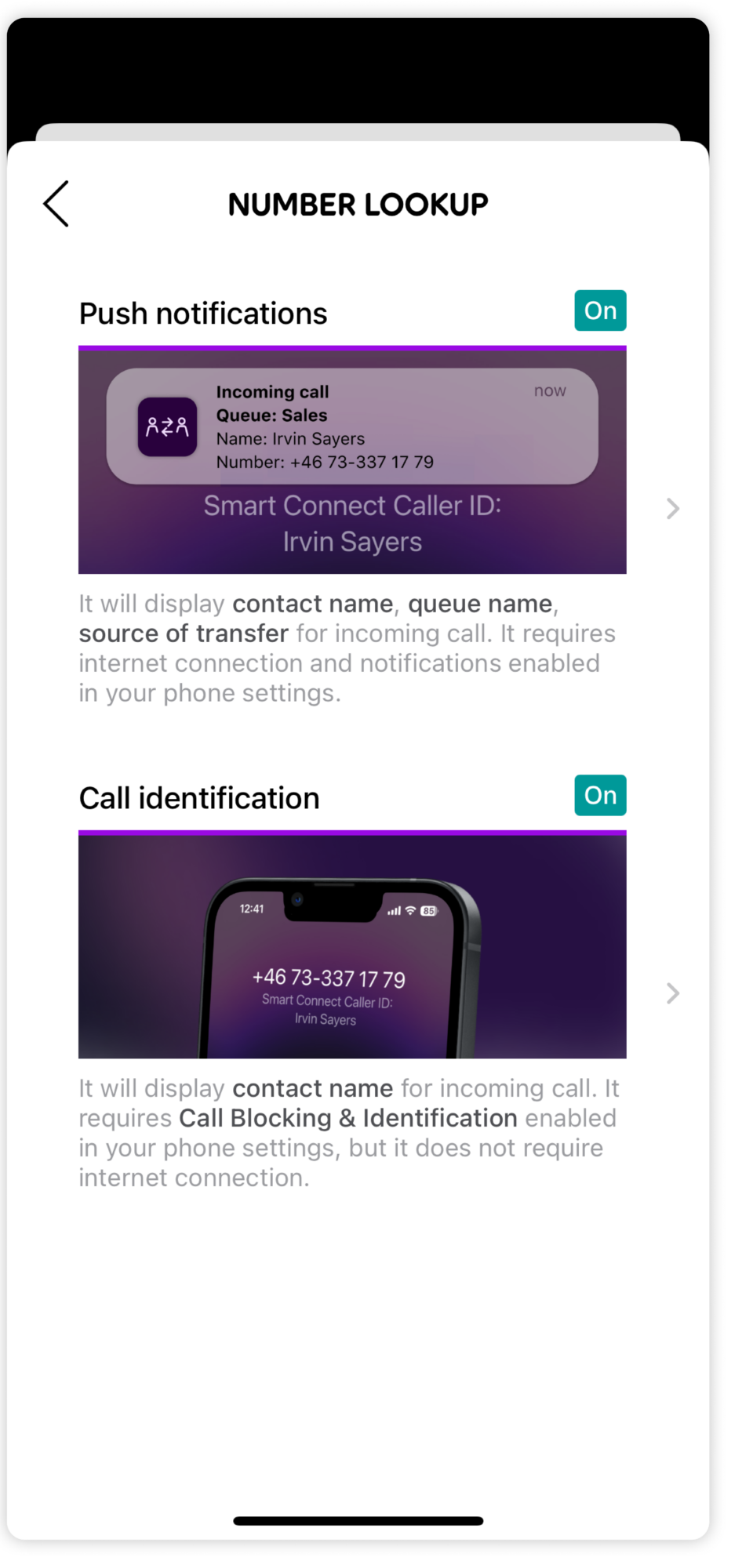
Open the app and tap your name or the settings icon.
-
Go to Number Lookup.
-
Enable push notifications.
-
Allow notifications in your iPhone settings.
-
Go to Call Blocking & Identification in your phone settings and enable Smart Connect.
For Android
-
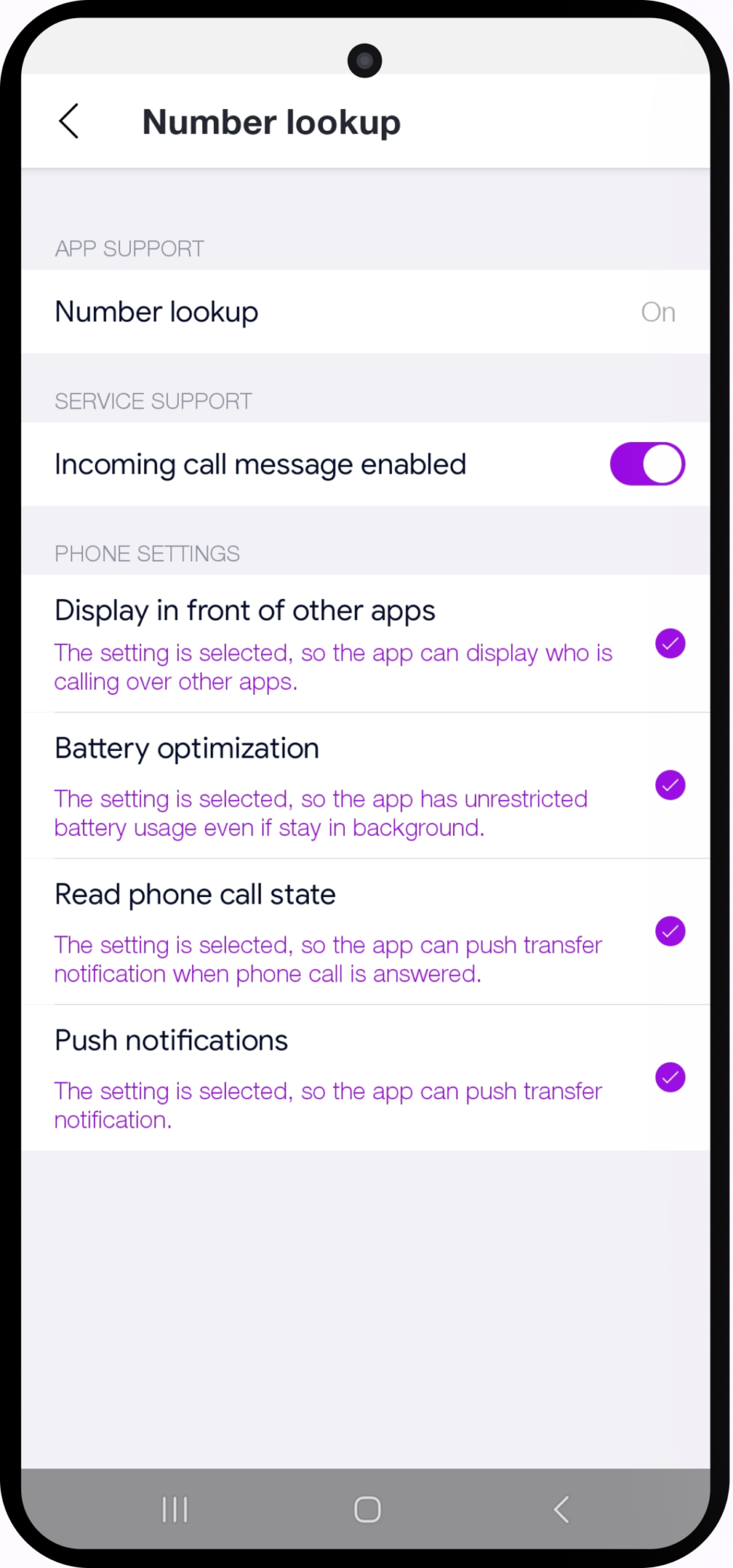
Open the app and tap your name at the top of the home screen.
-
Turn on Incoming call message enabled.
-
Accept permissions such as Display in front of other apps and adjust Battery optimisation settings if required.
Once activated, relevant caller information can appear directly on your screen when someone calls.
For detailed step by step guidance, see the Mobile App – Number Lookup user guide.
Add context to every incoming call
When you easily can see who’s calling and what queue and number the call is directed to, you can respond in a more personal and professional way. Number Lookup strengthens the connection between your mobile device and Smart Connect, helping you make more informed decisions before answering.
Would you like to ensure your team benefits from enhanced caller identification? Explore the user guide or contact us to learn more.



Ready to connect?
Speak with one of our local sales offices today to learn more about the possibilities and opportunities Telia Smart Connect can bring to your team.
Connect with us